
If your business website not showing on Google, the first thing to understand is that there is a difference between not being indexed and not ranking well.
Those two problems can look similar from the outside, but they need very different fixes.
A page that is not indexed may be invisible to Google completely. A page that is indexed may still appear so far down the search results that you never notice it.
Before paying for SEO, changing your website or publishing large amounts of new content, I would first work out which of those situations you are actually dealing with.
First Check Whether Google Knows the Website Exists
The quickest starting point is to search for your own business name.
Try:
- Your exact business name
- Your business name plus your town or area
- Your business name plus the main service you provide
If Google shows your website when you search for the exact business name, that is useful information.
It usually means the website is at least known to Google.
If you cannot find the website even when searching for the exact business name, I would investigate indexing before worrying about rankings for competitive service searches.
Use Google Search Console Instead of Guessing
Google Search Console is one of the most useful tools for this problem because it shows whether Google has discovered and indexed your pages.
For a specific page, use the URL Inspection tool.
You are looking for a clear answer to a basic question:
Is this URL on Google?
If the answer is yes, the problem is probably not basic indexing.
If the answer is no, Search Console can often give you a reason.
That reason is much more useful than simply publishing another blog post and hoping the problem disappears.
Check for an Accidental Noindex Setting
One of the first technical things I would check is whether the page has been told not to appear in search results.
A website can include a noindex instruction that effectively tells search engines:
Do not include this page in your index.
This can happen intentionally on pages such as checkout pages, account pages or internal forms.
It can also happen accidentally.
A surprisingly simple example is WordPress’s “Discourage search engines from indexing this site” setting. It is useful while a website is being built or tested, but if it stays enabled after launch, an otherwise perfectly working website can remain invisible to search engines.
SEO plugins can also apply noindex settings to individual pages or content types.
If an important service page is marked noindex, no amount of keyword editing will make that page rank until the instruction is removed and Google processes the change.
Make Sure the Page Is Not Blocked From Crawling
Indexing and crawling are related but not identical.
Google normally needs to be able to access a page before it can understand and index it.
A site’s robots.txt file can restrict search engine crawlers from certain parts of the website.
That can be useful for areas that should not be crawled, but it can also cause problems if important sections are blocked by mistake.
I would not recommend editing robots.txt blindly.
The important point for a business owner is simply this: if Google cannot properly access the page, changing the wording on the page will not solve the underlying problem.
Check the Canonical URL
Another technical detail worth checking is the canonical URL.
A canonical tells search engines which version of a page should be treated as the main version.
This is useful when similar or duplicate URLs exist.
But if a page accidentally points its canonical to another URL, Google may decide that the other page is the version it should index instead.
That can create confusing situations where a page exists, works normally for visitors and may even be crawled by Google, but does not appear in search results as expected.
Again, the useful approach is diagnosis first.
Do not start rewriting content until you know whether Google actually considers that URL the main page.
Is the Website Sitemap Working?
An XML sitemap helps search engines discover important pages on a website.
Most modern WordPress websites generate one automatically, either through WordPress itself or through an SEO plugin.
I would check that:
- A sitemap exists
- It opens without an error
- Important pages appear in it
- The sitemap has been submitted in Google Search Console
A sitemap does not guarantee rankings.
It is simply one of the mechanisms that helps Google discover and process the structure of the site.
If a page is missing from the sitemap, that does not automatically mean Google cannot index it, but it is another useful clue when diagnosing visibility problems.
A New Website May Simply Need Time
Sometimes there is no dramatic technical problem.
The website is simply new.
Google does not promise that every new page will appear immediately after publication.
Discovery, crawling and indexing can take time, especially on a website with little history and few external links pointing to it.
If a brand-new business website does not rank for competitive searches after a few days, that is not necessarily evidence that something is broken.
I would still confirm that the important pages are crawlable and indexable, but I would avoid constantly changing titles, URLs and page structure simply because Google has not reacted immediately.
Indexed Does Not Mean You Will Rank
This is where many website owners get understandably confused.
A page can be fully indexed and still be almost impossible to find through a normal search.
That is a ranking problem, not an indexing problem.
Imagine a plumber in a competitive town publishes a page called:
Plumbing Services
Google may index it perfectly.
But if dozens of established local businesses have stronger pages, more relevant content, better local signals and a longer history, that new page may appear far below them.
The technical side can therefore be completely correct while the website still has very little search visibility.
Check Whether the Page Actually Matches the Search
If a page is indexed but not ranking, I would look closely at what the page is actually about.
A common problem is that the business knows what the service is, but the page does not explain it clearly enough for either the visitor or the search engine.
For an important service page, ask:
- Does the page clearly name the service?
- Does it explain what is included?
- Does it answer obvious customer questions?
- Does it state the areas served where relevant?
- Does the title accurately describe the page?
- Is the page genuinely useful, or is it only a few vague sentences?
I would rather have one useful service page that clearly answers a customer’s questions than several thin pages created purely to target slightly different keywords.
Searching for Your Business Name and Searching for a Service Are Different Tests
This distinction is important.
If your website appears when someone searches for your business name, Google already understands that the business and website exist.
That does not mean you will automatically rank for searches such as:
accountant near me
or:
website designer for small business
Those searches are competitive and Google has to decide which businesses and pages are most useful for the person searching.
So I would treat these as two different questions:
- Can Google find and index the business website?
- Does the website deserve to rank for the searches the business wants?
The first is mainly a technical discovery problem.
The second is a relevance, quality and competition problem.
Google Business Profile Is Not the Same as Website Ranking
Local businesses also need to separate Google Business Profile visibility from normal organic website results.
Your Google Business Profile can appear in Maps or the local results while your website itself ranks poorly.
The opposite can also happen.
A business may have useful organic pages while its local profile is incomplete or poorly optimised.
For a local business, I would usually want both working together.
Check that the business name, phone number, website and service area are accurate and consistent.
Do not assume that improving the Google Business Profile automatically fixes every organic ranking problem on the website itself.
Check for Old URLs, Redirects and Migration Problems
Some visibility problems are not really SEO problems at all. They are leftovers from an old website, a domain change or a migration.
I would check for issues such as:
- The wrong website URL entered in Google Business Profile
- An old domain still appearing in search results
- Important pages returning errors
- Redirects pointing to the wrong place
- Pages accidentally left as drafts or private
- A recent website migration where redirects were not handled correctly
- Important content only available after scripts or interactions fail
A migration can create a particularly confusing situation: the new website may look completely normal to visitors while Google is still trying to understand what happened to the old URLs.
If an old service page used to live at one address and the replacement now lives somewhere else, a correct redirect helps search engines and visitors understand where that content moved.
This is another reason I prefer checking the mechanics before recommending a broad SEO campaign.
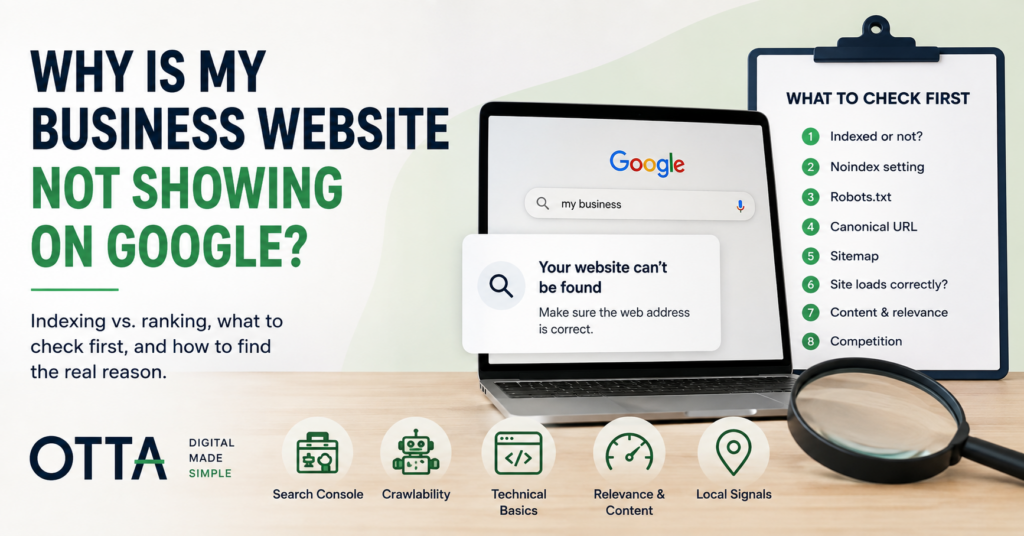
What I Would Check First
If someone told me their business website was not showing on Google, I would work through the problem in roughly this order:
- Search for the exact business name.
- Check the important URL in Google Search Console.
- Confirm the page is not marked noindex.
- Check that Google is not being blocked from accessing it.
- Verify the canonical URL.
- Check the XML sitemap.
- Confirm the page loads normally and does not redirect somewhere unexpected.
- If the page is indexed, move on to relevance, content and competition.
That order prevents a lot of wasted work.
There is little point rewriting a page for SEO if the page is accidentally marked noindex.
And there is little point repeatedly requesting indexing if the page is already indexed and the real problem is that stronger competitors outrank it.
Check the Website Before Buying More SEO
If you are not sure whether the website has basic problems with clarity, mobile usability, enquiries, SEO fundamentals, security or maintenance, the Free Website Health Check gives you a structured place to start.
It takes you through 25 practical questions and gives you an immediate score, category results and a prioritised list of areas worth checking.
You can also download the results as a PDF.
Start the Free Website Health Check
When You Need a More Detailed Review
If Google can index the site but you are still unsure why the website is underperforming, an outside review can help separate technical problems from content, usability and conversion issues.
Our Small Website Improvement Review looks at an existing website and identifies practical improvements without assuming that every problem requires a complete rebuild.
That is important because “not showing on Google” is not one problem.
It can be indexing, crawling, configuration, weak content, poor relevance, local competition or simply unrealistic expectations about how quickly a new website should rank.
The useful first step is identifying which one you actually have.
Final Thoughts
If your business website not showing on Google, do not start by changing everything.
First establish whether Google has indexed the website at all.
If it has not, investigate the technical reason.
If it has, stop treating the problem as an indexing issue and start looking at relevance, quality and competition.
Diagnose the problem first. SEO becomes much easier once you know what you are actually trying to fix.
Find our advice useful?
Add OTTA as a preferred source on Google.