
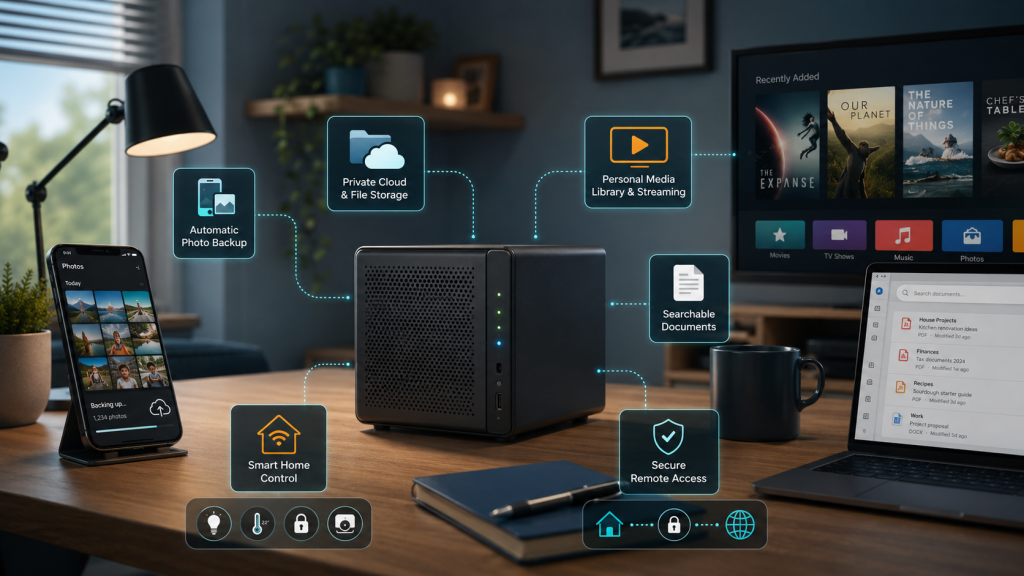
When people hear the words “home server”, they often imagine a rack full of noisy equipment, complicated command lines and something only an IT professional would understand.
But a home server does not have to be large, expensive or difficult to use.
A small mini PC, an older desktop computer or a purpose-built storage device can quietly handle useful jobs around the home. It can store files, back up photos, organise documents, stream media and provide access to your own services while you are away.
The important question is not:
Which server software should I install?
A better starting point is:
Which everyday problems could a small home server solve for me?
Automatically Back Up Photos From Your Phone
Most people now have thousands of photos stored on their phones. They may also rely entirely on one cloud provider to keep those photos safe.
A home server can provide an additional private photo library inside your own home.
Software such as Immich can automatically upload new photos from your phone when the app is configured correctly. You can then browse your photo collection by date, album or device without manually copying files every few weeks.
This does not mean that your home server should be the only copy of your photos. The server itself still needs a proper backup.
However, it can give you:
- an additional copy of your photos
- more control over where they are stored
- a shared household photo library
- less dependence on a single cloud account
For families taking a large number of photos, this can be one of the most immediately useful home-server functions.
Create Your Own Private File Cloud
Many people use services such as Google Drive, Dropbox or OneDrive to access files from different devices.
A home server can provide a similar private system.
Nextcloud, for example, can store documents, photos and shared folders while providing access through a browser, desktop application or phone app.
This can be useful for:
- accessing files from a laptop and phone
- sharing household documents
- synchronising selected folders
- keeping personal files under your control
- reducing scattered copies across several devices
A self-hosted file cloud is not automatically better than a commercial service. You become responsible for maintenance, updates, backups and secure access.
For the right household, however, it can offer a useful balance between convenience and control.
Build a Personal Film and Television Library
A small home server can also organise films, television programmes, music and home videos stored on your own drives.
Software such as Jellyfin presents this content through an interface similar to a streaming service. You can browse posters, descriptions, episodes and collections from a television, computer, tablet or phone.
This can be especially useful when you already own a collection of legally obtained media and want to access it without searching through folders or connecting external drives.
The hardware requirements depend heavily on how the media will be played. Directly playing compatible files may require relatively little processing power. Converting video into another format while it is being watched can require significantly more capable hardware.
This is one reason why choosing the correct server should begin with the intended use rather than with a list of popular components.
Turn Paper Documents Into a Searchable Archive
Invoices, insurance documents, letters, receipts and manuals can quickly become difficult to organise.
A home server can help create a searchable digital document archive.
Paperless-ngx, for example, can process scanned documents, extract text and help organise files using correspondents, document types and tags.
Instead of remembering the original filename or folder, you can search for text contained inside the document.
A practical workflow might look like this:
- Scan or photograph a document.
- Place it in an import folder.
- Let the server process the document.
- Review and organise it.
- Find it later using a search.
This does not remove the need to retain original documents where legally required. It can, however, make everyday paperwork considerably easier to retrieve.
Control Smart-Home Devices Locally
Smart-home devices often rely on separate manufacturer apps and external cloud services.
Home Assistant can bring many of those devices together in one local system.
Depending on the devices and integrations used, it can control:
- lights
- heating
- plugs
- sensors
- locks
- televisions
- energy monitoring
- household automations
For example, lights could switch on before sunrise, heating could respond to room temperatures, or a notification could appear when the washing machine has finished.
Running Home Assistant locally can reduce dependence on external services, but not every connected device works completely without the manufacturer’s cloud. Compatibility should be checked before buying hardware.
The main benefit is not simply having more automation. It is having one central place to manage the home in a way that matches how the household actually works.
Access Your Services While Travelling
A home server is most useful when you can access the right services outside your home without exposing everything directly to the internet.
Tools such as Tailscale can create an encrypted private network between authorised devices. Your laptop or phone can then connect to selected home services as though it were still on your home network.
This can provide access to:
- private files
- photos
- Home Assistant
- internal dashboards
- document archives
- other authorised devices
Remote access still needs to be configured carefully. Account security, device security, updates and recovery options all remain important.
The goal should not be to make every service publicly accessible. It should be to provide controlled access only where it is genuinely needed.
Run Useful Household Tools
A home server does not need to be limited to storage and backups.
It can also run smaller applications for everyday household tasks, such as:
- recipe management
- shared shopping lists
- household inventories
- calendars
- equipment documentation
- monitoring dashboards
- maintenance records
These tools may not justify buying a server on their own. But once a reliable server is already running, they can add useful functions without requiring another subscription for every small task.
The key is restraint. Installing twenty applications because they look interesting often creates more maintenance than value.
A good home server should solve real problems, not become a collection of forgotten software.
Do You Need Expensive Server Hardware?
Not necessarily.
A modest mini PC can be enough for file storage, document management, Home Assistant and several lightweight applications. An older desktop computer may also be suitable, although electricity consumption should be considered if it will run continuously.
More demanding tasks may require better hardware, particularly when working with:
- several large hard drives
- video transcoding
- large photo libraries
- many simultaneous users
- virtual machines
- local artificial intelligence workloads
The correct hardware depends on the workload, storage requirements, backup plan and expected growth.
Buying the most powerful system is not always the best approach. A smaller, efficient server that is properly backed up and understood is often more useful than an oversized system that becomes difficult to maintain.
What a Home Server Cannot Do for You
A home server is not a maintenance-free replacement for commercial cloud services.
Someone still needs to manage:
- software updates
- security
- user accounts
- storage capacity
- backups
- hardware failures
- remote access
- documentation
It is also important to understand the difference between storage and backup.
Saving files on a home server does not automatically mean they are safely backed up. Important data should normally exist in multiple copies, with at least one copy protected from failure, deletion, theft or damage affecting the main server.
A home server can provide more control, but that control also creates responsibility.
Start With the Problem, Not the Software
You do not need to become a server expert before benefiting from a home server.
Start with one clear objective:
- I want an additional backup of my phone photos.
- I want to access household files from several devices.
- I want to organise scanned documents.
- I want local smart-home control.
- I want to stream my own media collection.
- I want secure access to selected services while travelling.
Once the objective is clear, it becomes much easier to choose suitable hardware and software.
A small home server is not just a technical hobby. When it is planned carefully, it can become a practical household tool that quietly handles repetitive jobs and keeps important information organised.
Already Running a Home Server?
It is common for a home server to grow gradually. One application becomes five, storage fills up, remote access is added and backups are assumed to be working.
My written Home Server Setup Check reviews the information you provide about your current setup and identifies practical concerns involving structure, backups, updates, storage, security and maintainability.
The review is completed without a phone call or remote access to your system. You receive a clearly structured written report with observations and prioritised next steps.
Find our advice useful?
Add OTTA as a preferred source on Google.