
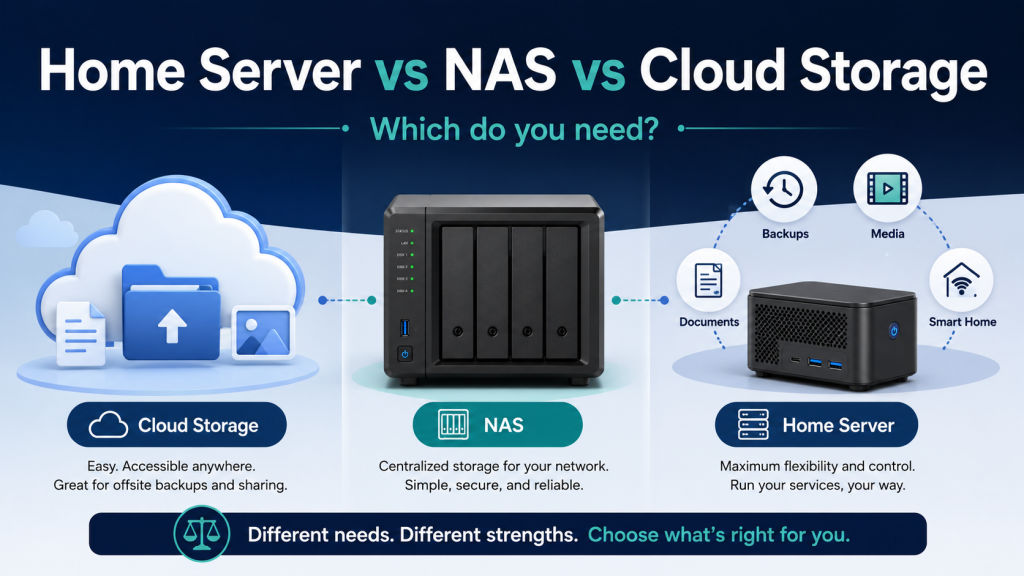
Home server vs NAS is a common comparison when deciding how to store photos, documents, backups, media or smart-home data. Cloud storage is another option, and each approach solves a slightly different problem.
- Cloud storage
- A NAS
- A home server
At first, they can sound like different names for the same thing. They are not.
Each option solves a slightly different problem. The right choice depends less on what is technically possible and more on what you actually want to do, how much control you need, and how much maintenance you are willing to accept.
The good news is that you do not need to start with the most complicated solution.
Cloud Storage: The Simplest Option
Cloud storage means your files are stored on servers operated by another company.
Common examples include Google Drive, Microsoft OneDrive, Dropbox, iCloud, and similar services.
You install an app, upload your files, and access them from your phone, computer, or web browser.
For many people, this is enough.
Cloud storage is a good fit when you mainly want to:
- store documents and photos,
- access files from several devices,
- share folders with other people,
- avoid maintaining your own hardware,
- keep things simple.
The biggest advantage is convenience.
You do not need to buy a server, configure storage, install updates, or think about remote access. The provider handles most of the technical work.
However, you are also giving up some control.
Your storage space, pricing, account access, features, and privacy options depend on the provider. If the service changes its prices or limits, you have to accept those changes or move elsewhere.
Cloud storage is not automatically bad or insecure. It is simply a service operated by someone else.
For many households and small businesses, that trade-off is perfectly reasonable.
What Is a NAS?
NAS stands for Network Attached Storage.
In simple terms, it is a storage device connected to your home or office network.
Instead of saving files only on one computer, you store them on the NAS and access them from several devices.
A NAS often contains two or more hard drives and may offer protection against the failure of one drive.
Typical NAS brands include Synology, QNAP, Asustor, and TerraMaster.
A NAS is useful when you want to:
- store files locally,
- create automatic computer backups,
- keep a central photo or document library,
- stream media around the house,
- share folders between several users,
- reduce your dependence on cloud storage.
Compared with a normal external hard drive, a NAS is available over the network and can usually run continuously.
Modern NAS systems can also do much more than file storage. Many support apps, containers, photo management, media servers, surveillance recording, and remote access.
This is where the line between a NAS and a home server starts to become less clear.
What Is a Home Server?
A home server is a computer that runs services for your household or small business.
It may store files, but storage is only one possible function.
A home server can also run applications such as:
- Nextcloud for files, calendars, and contacts,
- Immich for photo management,
- Jellyfin for media streaming,
- Home Assistant for smart-home control,
- Paperless-ngx for document management,
- AdGuard Home or Pi-hole for network-wide DNS filtering,
- password managers,
- recipe managers,
- dashboards,
- backup tools,
- monitoring services,
- small websites or internal tools.
The hardware can be almost anything.
It might be:
- a small mini PC,
- a reused desktop computer,
- a dedicated server,
- a single-board computer,
- or even a NAS that supports containers and virtual machines.
A home server gives you much more flexibility than basic cloud storage or a simple NAS.
It also gives you more responsibility.
You have to think about:
- operating system updates,
- application updates,
- backups,
- storage health,
- security,
- remote access,
- user accounts,
- power consumption,
- recovery when something breaks.
A home server can be extremely useful, but it is not maintenance-free.
NAS and Home Server: What Is the Real Difference?
There is no perfect technical dividing line.
A NAS is mainly designed around storage.
A home server is mainly designed around running services.
A basic NAS may only provide shared folders and backups. A more advanced NAS may run Docker containers, virtual machines, photo software, and media servers.
At that point, it is effectively acting as a home server as well.
The practical difference is usually the starting point.
With a NAS, the main question is:
“How can I store and protect my files?”
With a home server, the main question is:
“What services do I want to run?”
That difference matters because it affects which hardware, storage layout, operating system, and backup strategy make sense.
When Cloud Storage Is Enough
You probably do not need a NAS or home server if your needs are simple.
Cloud storage may be the best choice when:
- you only have a moderate amount of data,
- you do not want to maintain hardware,
- you need easy access from anywhere,
- you mainly store documents and photos,
- you are comfortable paying a monthly or yearly fee,
- you do not need specialised applications.
There is no benefit in building a server simply because it sounds more advanced.
A solution that is easy to understand and reliably maintained is better than a complex setup that is forgotten after a few months.
For example, someone with 50 GB of documents and family photos may be better served by a normal cloud-storage plan than by buying a NAS, hard drives, a UPS, and backup storage.
When a NAS Makes Sense
A NAS becomes attractive when storage is the main requirement.
It may be a good choice if:
- several people need access to the same files,
- you want automatic local backups,
- your photo or video collection is growing,
- you want local media streaming,
- you prefer data to remain in your home,
- you want a relatively user-friendly system,
- you do not need complete freedom over the operating system.
A commercial NAS can be easier to manage than a self-built server.
The web interface is usually designed for non-specialists, storage management is integrated, and many common tasks are guided through menus.
The disadvantage is that you are limited by the hardware, software platform, and app ecosystem provided by the manufacturer.
Some NAS systems are very flexible. Others become restrictive once you want to do something beyond basic storage and backups.
When a Home Server Makes Sense
A home server is usually the better option when applications are more important than simple file storage.
It may suit you if you want to:
- run several self-hosted services,
- use Docker containers,
- control the operating system,
- choose your own hardware,
- integrate storage, automation, backups, and monitoring,
- experiment and learn,
- replace several separate cloud services,
- build a system around your own workflow.
A home server is also useful when you already know that your requirements will grow.
For example, you may start with file storage and later add:
- photo management,
- document scanning,
- media streaming,
- smart-home services,
- password management,
- network monitoring.
A flexible server can handle these changes more easily than a storage-only device.
However, flexibility creates complexity.
Every additional service needs updates, backups, monitoring, and a recovery plan.
You May Need More Than One Option
These choices are not mutually exclusive.
A sensible setup may use all three.
For example:
- a home server runs your applications,
- a NAS stores large files and backups,
- cloud storage keeps an additional off-site copy of important data.
This is often more realistic than trying to force one device to do everything.
A local server is not automatically a backup.
A NAS with two drives is not automatically a backup.
Cloud synchronisation is not always a backup either.
If a file is deleted, corrupted, encrypted, or overwritten, that change may be synchronised to every connected location.
A reliable setup needs separate backup copies and a clear recovery process.
A Simple Decision Guide
Choose cloud storage if:
- simplicity is your main priority,
- you want minimal maintenance,
- your storage needs are moderate,
- you are comfortable using a third-party service.
Choose a NAS if:
- local file storage is the main goal,
- you want shared folders and backups,
- you prefer an integrated and relatively simple appliance,
- you may want a few additional apps.
Choose a home server if:
- you want to run multiple applications,
- you need more control and flexibility,
- you are comfortable maintaining the system,
- you understand that backups and security remain your responsibility.
Choose a combined setup if:
- you want local services,
- you have a large amount of data,
- you need reliable backups,
- you want important data stored in more than one location.
Do Not Buy Hardware Before Defining the Job
One of the most common mistakes is buying hardware first and deciding what to do with it later.
A powerful server does not automatically create a good setup.
Before buying anything, write down:
- which services you want to run,
- how much storage you need now,
- how quickly that storage will grow,
- how many users will access it,
- whether remote access is required,
- how important downtime would be,
- how backups will work,
- how much maintenance you are willing to do.
These answers usually make the right direction much clearer.
Someone who only needs shared files may be better served by a small NAS.
Someone who wants Home Assistant, Nextcloud, Paperless-ngx, and Jellyfin may need a more flexible server.
Someone who simply wants reliable access to documents may not need local hardware at all.
Start Smaller Than You Think
You do not need a large rack server, expensive enterprise hardware, or dozens of hard drives.
Many useful home-server setups can run on a small, efficient mini PC.
You can also begin with one or two services and expand only when there is a real reason.
A small system that is documented, backed up, and understood is much more valuable than a large system that has become difficult to manage.
The goal should not be to run as many applications as possible.
The goal should be to solve real problems reliably.
Final Thoughts
Cloud storage, a NAS, and a home server are all valid options.
The best choice depends on your priorities.
Cloud storage offers convenience.
A NAS offers central local storage.
A home server offers flexibility and control.
The wrong choice is usually not the least powerful option. It is the option that creates more cost, complexity, and maintenance than the user actually needs.
Define the job first. Then choose the simplest system that can do it reliably.
If you already have a small server, NAS, mini PC, or a list of services you want to run, the OTTA Home Server Setup Check can help you identify unnecessary complexity, missing backups, security concerns, and practical improvements before you invest more time or money.
Find our advice useful?
Add OTTA as a preferred source on Google.