
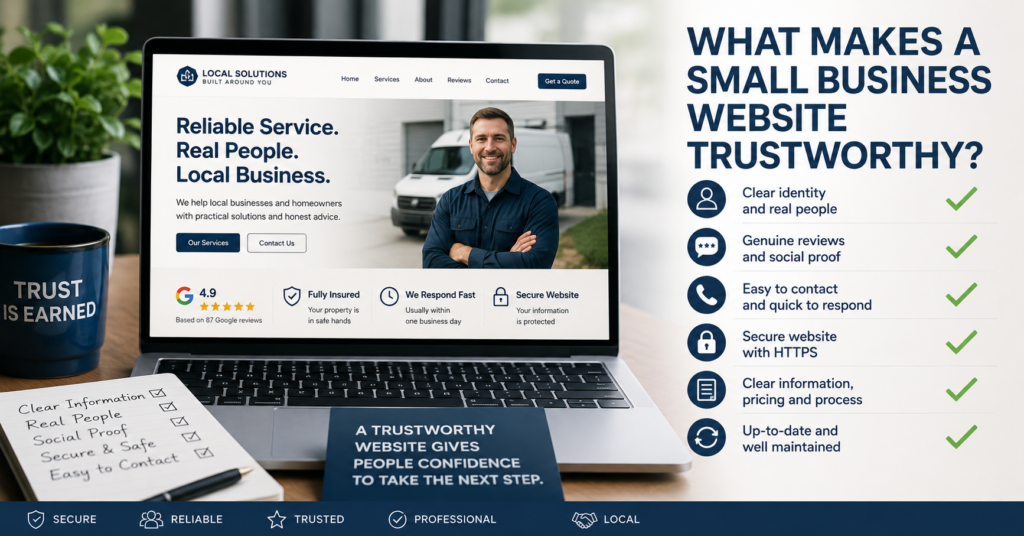
What makes a small business website trustworthy?
It is rarely one thing.
Trust usually comes from a series of small signals that all point in the same direction: this business is real, professional, current and likely to respond.
The opposite is also true.
A website can look attractive and still create doubt if the contact details do not match, the content feels outdated, the photos look generic, the reviews are missing or the next step is unclear.
For a small business website, I would focus less on trying to “look impressive” and more on removing reasons for hesitation.
Trust Is Built by Consistency
One of the simplest trust checks is consistency.
The business name, phone number, email address, service area and website details should all agree with each other.
If the website says one thing and Google Business Profile says another, a visitor may start wondering which information is correct.
I would check:
- Business name
- Phone number
- Email address
- Opening hours where relevant
- Service area
- Website URL
These details sound basic, but they are exactly the kind of thing people use to decide whether a business feels organised.
Make It Obvious Who Is Behind the Business
A small business usually has an advantage that larger companies sometimes struggle to reproduce: there are real people behind it.
I would use that.
An About page does not need to be a long company history.
It should simply help the visitor understand who runs the business, what experience they have and what kind of service they provide.
Useful details can include:
- The name of the owner or team
- Relevant experience
- Professional background
- Qualifications where they matter
- How long the business has been operating
- A genuine photo
For many small businesses, a real photo of the person behind the service builds more trust than a polished stock image of people in suits around a meeting table.
Real Photos Usually Beat Generic Stock Photos
Stock photography is not automatically bad.
Sometimes it is the practical choice.
But if every image on a local business website looks like it came from the same corporate image library, the site can start to feel anonymous.
Where possible, I would rather see:
- The actual team
- The real premises
- Previous work
- Vehicles or equipment
- Products
- The local area
It does not need to look like a professional advertising campaign.
A clear, genuine photograph can be more convincing than a perfectly staged image that has nothing to do with the business.
Reviews Help Most When They Feel Real
Customer reviews are one of the strongest trust signals available to a small business.
But simply writing “Our customers love us” does not prove much.
Useful reviews are specific.
They might mention:
- The service provided
- The quality of the work
- Communication
- Reliability
- How a problem was handled
If reviews exist on Google or another recognised platform, I would make it easy for visitors to find them.
I would also avoid filling the website with dozens of vague testimonials that all sound as if the same person wrote them.
A smaller number of genuine, specific reviews usually feels more credible.
Show Evidence, Not Just Claims
Many small business websites use phrases such as:
Professional service. Quality work. Customer focused.
There is nothing wrong with those statements.
But almost every competitor can say exactly the same thing.
I would try to support the claim with evidence.
For example:
- Show completed work
- Explain the process
- Show relevant qualifications
- Link to genuine reviews
- State how long the business has operated
- Explain guarantees or aftercare where relevant
The more a website can demonstrate, the less it has to rely on marketing language.
Make Contact Details Easy to Verify
A visitor should not have to hunt for a way to contact the business.
I would expect important contact details to be easy to find from anywhere on the site.
Depending on the business, that may include:
- A phone number
- An email address
- A contact form
- A physical location
- A clearly stated service area
On mobile, phone numbers should ideally be tappable.
Email links should open the correct address.
And the contact form should actually work.
A business can lose trust very quickly if somebody submits an enquiry and hears nothing because the message never arrived.
Tell People What Happens Next
One of the easiest ways to reduce uncertainty is to explain what happens after somebody contacts you.
For example:
Send us your details and we will reply within one business day.
or:
After your enquiry, we will arrange a short call to understand what you need.
That small piece of information gives the visitor a clearer picture of the process.
It also makes the business feel more organised.
Be Clear About Pricing Where You Can
Price transparency can be a strong trust signal.
That does not mean every business needs a fixed price list.
Some services genuinely depend on the scope of the work.
But if possible, I would give the visitor something useful.
That might be:
- A fixed price
- A starting price
- A typical range
- An explanation of what affects the cost
- What is included
“Contact us for a quote” is sometimes unavoidable.
But if every page hides every indication of cost, visitors may assume the business is expensive, unclear or difficult to deal with.
Do Not Overpromise
Trust can also be damaged by claims that are simply too big.
Phrases such as:
- Best in Ireland
- Guaranteed number one on Google
- 100% secure
- Cheapest anywhere
can make a website sound less credible rather than more impressive.
I prefer specific promises that a business can actually control.
For example:
- We respond within one business day
- We provide a written quote before work starts
- We explain what is included
- We keep you updated during the project
Those statements are much easier for a customer to trust because they describe a real process.
HTTPS Matters, but It Is Only One Signal
A trustworthy business website should open using HTTPS without browser security warnings.
If a browser displays “Not secure” or a certificate warning, many visitors will leave immediately.
That is especially damaging on pages where people are expected to:
- Enter personal information
- Submit a contact form
- Log in
- Make a payment
But HTTPS alone does not make a business trustworthy.
Trust also means handling the details people send you with care. When someone fills in your contact form, it helps to know where that information goes. See keeping website data in Europe for what to check.
It simply removes one obvious reason for distrust.
Small Signs of Neglect Add Up
This is one of the things I would look at closely on an existing website.
Small details can make the site feel abandoned even when the business itself is active.
Examples include:
- An old copyright year
- Broken images
- Dead links
- Old staff members still listed
- Services the business no longer provides
- Old opening hours
- Blog posts that refer to events from years ago as if they are current
Individually, none of these things is necessarily serious.
But several together can create a very clear message:
Nobody is looking after this website.
That is not the impression you want a potential customer to take away.
The Website Should Feel Current
A trustworthy website does not need to be redesigned every year.
It does need to feel maintained.
I would rather see a simple website with accurate, current information than a beautiful website with old contact details and broken pages.
Regular maintenance can include:
- Updating service information
- Checking contact details
- Testing forms
- Reviewing important links
- Keeping software updated
Trust is not only about design.
It is also about whether the website looks like somebody is still responsible for it.
What I Would Check First
If I were reviewing whether a small business website feels trustworthy, I would start with these questions:
- Is it immediately clear who the business is?
- Are the contact details easy to find and consistent?
- Does the website show genuine reviews or evidence of previous work?
- Are there real signals that the business exists outside the website?
- Does the site explain what happens after an enquiry?
- Is pricing or cost guidance provided where practical?
- Does the website use HTTPS without warnings?
- Are the content and business details current?
- Are there broken links, missing images or abandoned pages?
I would fix those things before worrying about adding more animations, trust badges or decorative features.
Check the Website From a Visitor’s Point of View
If you are not sure how your own website comes across, the Free Website Health Check gives you a structured way to review it.
It takes you through 25 practical questions covering clarity and trust, mobile usability, contact and conversion, SEO basics, security and maintenance.
You receive an immediate score, category results and a prioritised list of areas worth checking. You can also download the results as a PDF.
Start the Free Website Health Check
When an Outside View Helps
Trust problems can be difficult to see on your own website because you already know the business.
You know the phone number is correct.
You know the business is legitimate.
You know what the service includes.
A new visitor knows none of that.
If you want an independent review of an existing website, our Small Website Improvement Review looks for practical areas worth improving without automatically assuming the website needs to be rebuilt.
Final Thoughts
So, what makes a small business website trustworthy?
Usually not one dramatic feature.
It is the combination of accurate information, real people, genuine evidence, clear expectations, working contact routes and a website that feels maintained.
Each of those signals removes a little uncertainty.
A trustworthy website does not need to prove that the business is perfect. It needs to give the visitor fewer reasons to doubt that the business is real, competent and worth contacting.
Find our advice useful?
Add OTTA as a preferred source on Google.